
Design Your Frame From Home
Welcome to our virtual framing tool, where you can design your own frame and request a quote for your design set up all from the comfort of your work desk or kitchen table.
Upload your artwork or photo, explore real frame styles, and see how your piece could look framed — even on your own wall. If you need some inspo browse some samples here.
How It Works (Detailed how to at the bottom of the page)
1. Upload
Upload your artwork, image or photo.
2. Design
Try different frame and mat combinations virtually.
3. Send
Submit your preferred design and we’ll follow up with pricing and options.
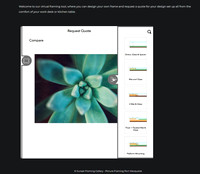 Frameing Setup OptionsThis section allows you to choose the framing set up style, for example, a single matt or double matt.
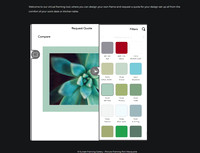 Mat Board ChoicesThis section is where you get to select what colour mat board surround you want around your art.
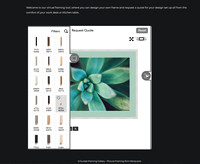 Frame Moulding SelectionThis is the section you get to choose and compare frame styles. You can even download a mock up completed frame image.
This tool is designed to help you explore framing ideas before visiting the gallery or requesting a quote.
Don’t stress about getting it perfect — this is simply the starting point of the design process.
See our finished framing portfolio for ideas Find Out More About Our Picture Framer
Why We Introduced This Tool
Framing can feel hard to visualise, especially when trying to match a home, office, or interior space.
We introduced this tool to make the design process easier, more collaborative, and more accessible for both our local clients and artists.
What happens After You Submit A Quote Request?
We’ll review your design and contact you to discuss pricing, sizing, and any refinements if needed.
*Do I have to send a quote and other FAQ*
How To Use The Virtual Framing Tool
1. Upload Your Artwork or Photo
Upload an artwork, photograph, canvas, memorabilia item, or image you would like to frame.
2. Enter Your Artwork Size
Select the type of item and enter the approximate measurements.
Don’t stress if they aren’t exact at this stage — we can refine sizing later if needed.
3. Explore Framing Styles
Use the side tabs to:
- choose frame styles
- test mat board colours
- adjust mat widths
- compare different layouts
4. View It Larger
Use the expand button to preview your design larger and download a mock-up image if desired.
5. Test It On Your Wall
Upload a room photo to virtually place the artwork onto your wall or interior space.
6. Request A Quote
Once happy with your concept, submit the quote request form and we’ll follow up with pricing and recommendations.
Need Help?
This tool is designed as a starting point.
If you get stuck, feel overwhelmed, or simply prefer guidance, we’re always happy to help refine the final setup with you.
Frequently Asked Questions
Do I need exact measurements to start?
It is best to get as close as possible for the best visualisation however exact measurements can be confirmed later during the final quoting stage.
Can I use this tool on my phone?
Yes. The tool works on both desktop and mobile devices, although desktop generally provides the easiest design experience.
Can I upload photos as well as artwork?
Absolutely. The system can be used for:
Are the frame choices real frames?
Yes. The frame options shown are based on actual framing products available through our professional suppliers.
See examples of our completed custom framing
Is this tool only for artists?
No. Anyone can use the tool, whether you are framing:
- family photos
- gifts
- original artwork
- home décor
- office pieces
- or exhibition work.
Does submitting a quote request place an order?
No. Submitting a request simply sends us your preferred design so we can discuss pricing, sizing, and any refinements with you.
What if I don’t know what frame style suits my artwork?
That’s completely normal. This tool is designed to help you explore ideas visually before making decisions.
We are always happy to guide you through the final design process if needed.
Can I see what the artwork will look like on my wall?
Yes. One of the major features of the tool is the ability to upload a room photo and virtually place your framed artwork onto the wall.
Can I save or download my design?
Yes. The tool allows you to download mock-up images of your framed design.
Why do some mat boards show a thin inner line?
Some mat boards have a coloured core beneath the surface paper. This may appear as a fine line on the inside edge of the mat.
Will the final framed product look exactly like the mock-up?
The mock-up is designed as a visual guide. Colours, proportions, and screen settings may vary slightly from the final physical product.
Can I use this for oversized or custom projects?
Yes. Even if your project is unusual or oversized, the tool can still help start the design conversation before we finalise the details together.
You can explore our oversize framing service here
What if I get stuck?
Just contact us. This tool is designed to make the process easier, not stressful.